Workflows · early access
A deal moves to Won. Onboarding is already moving.
The kick-off task, the welcome email, the check-in a week later: the steps that live on sticky notes and in someone’s head. Tell Smooth Operator once, or draw it on the canvas, and it happens every time something changes in your CRM.
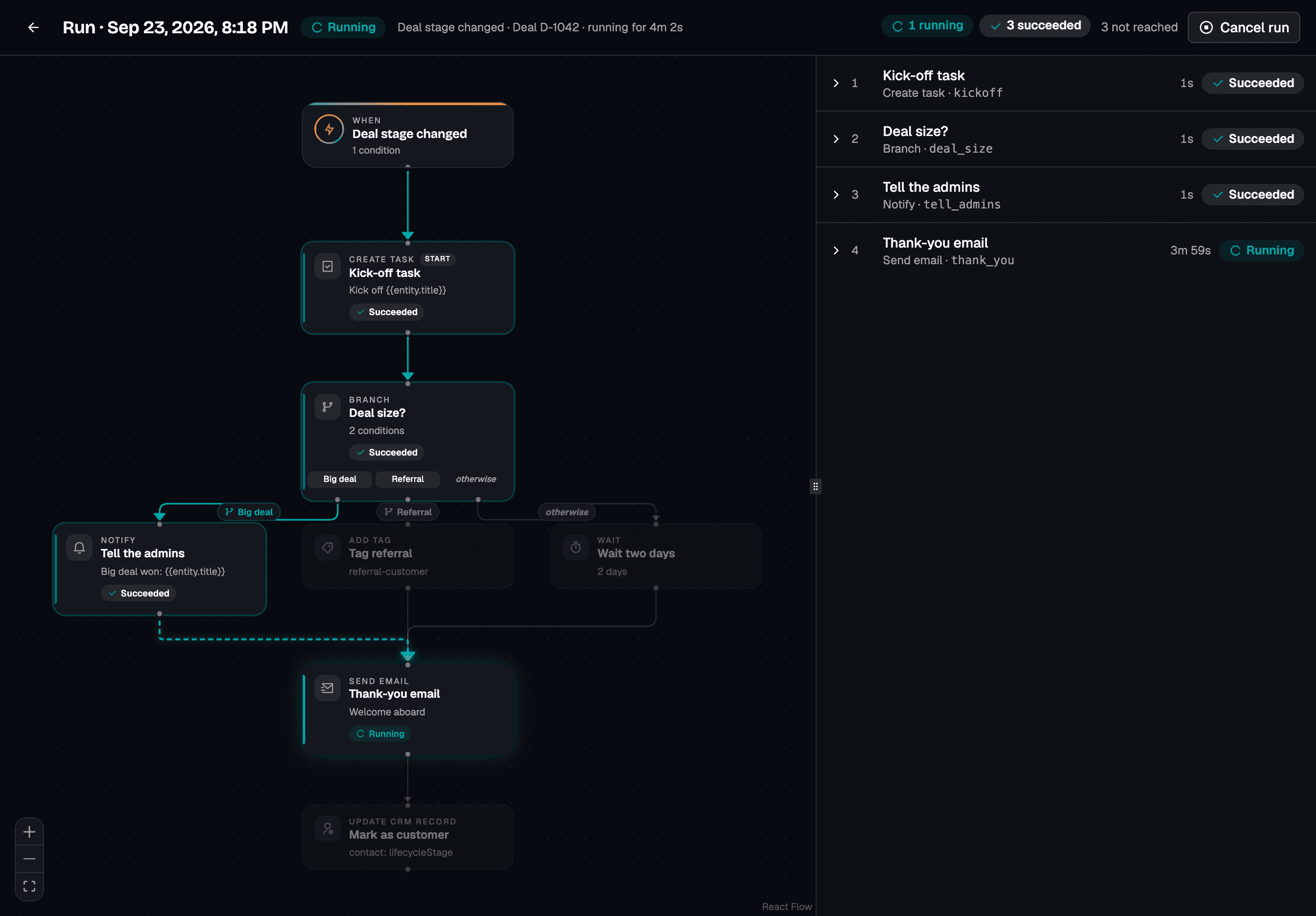
Describe it once. It runs every time.
1
Say it.
Tell Smooth Operator what should happen. It reads your event catalog and step palette, then drafts the whole workflow for you to approve.
2
Shape it.
Open it on the canvas. Drag steps, set conditions, insert fields like the contact’s first name. Every problem is pinned to the step that has it.
3
Watch it run.
Each run shows the steps it took, what each one saw, and what it did. Failures say why, and you can cancel a run mid-flight.
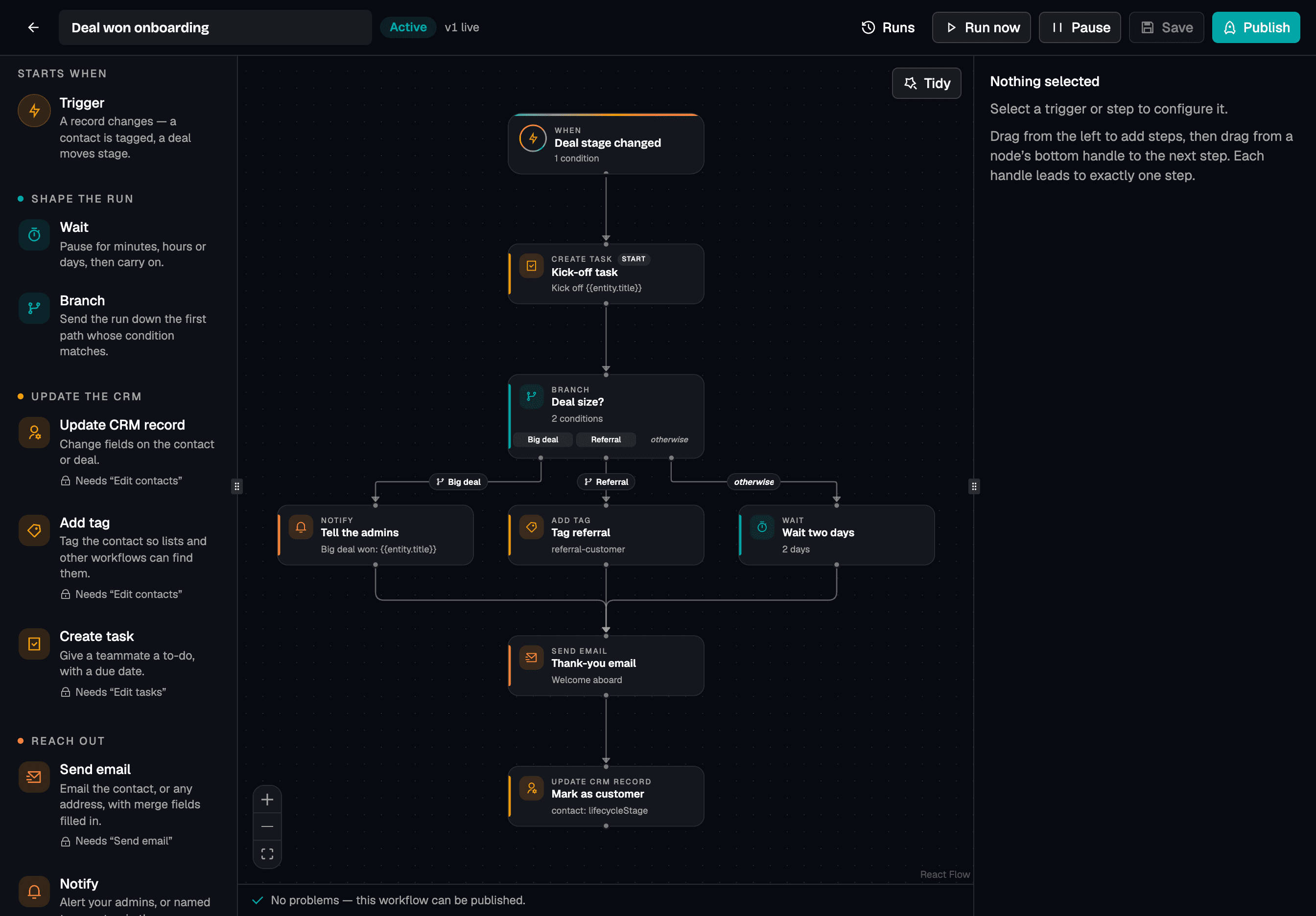
Tell Smooth Operator what should happen. You approve, it builds.
It reads what can start a workflow and what each step needs, drafts the whole thing, and asks before anything goes live.
The same workflow tools are on Smoo’s MCP server, so an assistant you connect gets them too, with your role’s permissions and nothing more.
Pick the moment. Chain the work.
When…
Narrow any of these with a condition, like “only when the tag is VIP”.
- A contact is created, updated, or deleted
- A contact is tagged, or a tag comes off
- A deal is created or updated
- A deal moves to a new stage
- A task is created or completed
- You press Run now
…then
Any mix, up to 100 steps, one after another.
- Send an email
- from your connected SendGrid, skipped for anyone who unsubscribed
- Wait
- an hour, a day, a few weeks
- Branch
- on the deal size, the stage, a tag, anything on the record
- Update the contact or deal
- stage, owner, value, lifecycle
- Add a tag
- so the next workflow can pick it up
- Create a task
- on the record, due in so many days
- Notify your team
- in the app and on their phones
- Call a webhook
- to reach the tools outside Smoo
Every run leaves a receipt. Every step, what it saw, what it did.
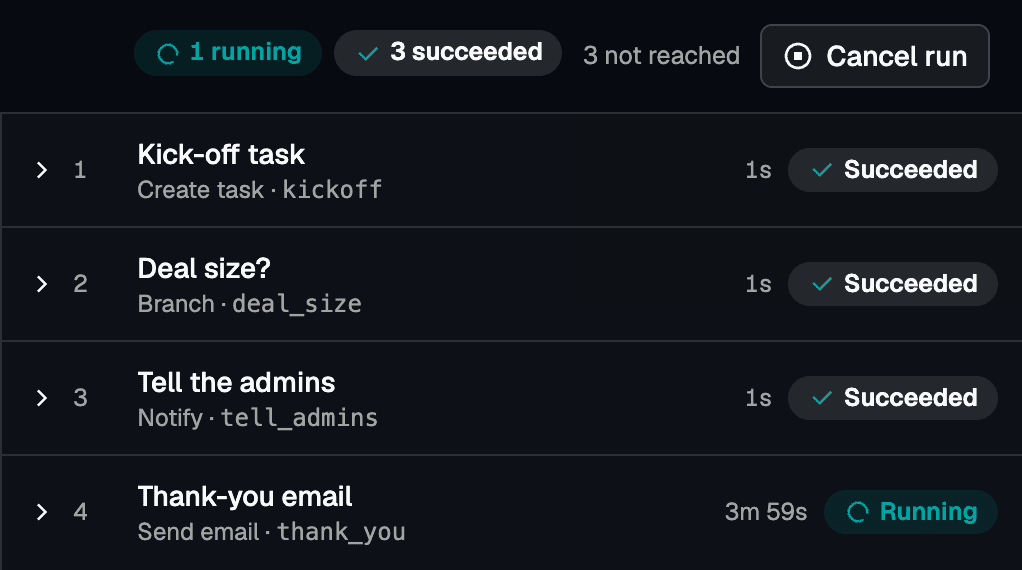
A seven-day wait is a real timer.
Runs are durable. A wait survives restarts and deploys, and picks up exactly where it left off.
Hiccups retry on their own.
A timeout or a busy server gets retried. An email step doesn’t blindly retry, so a customer isn’t emailed twice.
You see exactly what ran.
Each step keeps the input it actually used, with every field filled in, plus its result or its error. Runs keep the version they started on.
It owns the execution. You own the constraints.
You can’t publish what you can’t do.
Publishing checks every step against your role. Without “Send email”, an email step doesn’t go live — from the canvas, the API, Smooth Operator, or MCP.
It checks again before every step.
A workflow acts as the person who published it. If they lose a permission, its runs stop as blocked and your admins get told.
It can’t set itself off.
A workflow never re-triggers itself, and a chain of workflows triggering each other stops after five hops.
Nothing goes live half-built.
Drafts can be messy. Publish lists every problem first, and a live workflow keeps running its published version while you edit.
Every change is on the record.
Creating, publishing, turning on, running, and cancelling all land in the audit log, with who did it and when.
Welcome VIPs
Draft · edited by a teammate without email rights
- Send emailNeeds “Send email”, which you don’t have
- Create taskNeeds “Edit tasks”
- Update CRM recordNeeds “Edit contacts”
- WaitNo permission needed
The questions people ask first. Straight answers.
Will this replace my team?
No. Workflows take the steps nobody should have to remember, like the kick-off task and the check-in a week later, so your people spend their time with the customer. A notify step puts a person in the loop wherever you want one, and every run is there to review.
How is this different from an app-to-app automation tool?
Those tools reach into your CRM from the outside. Workflows run inside it, on your records, under your team’s permissions, and Smooth Operator can build them, check on them, and explain a run for you.
Can Smooth Operator change a workflow without asking?
No. Creating, editing, publishing, turning on, running, and deleting a workflow all wait for your approval. Looking at workflows and their runs doesn’t.
What happens when a step fails?
A temporary problem, like a timeout or a busy server, is retried on its own. A permanent one, like a bad address or a deleted record, stops the run and records why on that step. You can also mark a step to carry on past a failure.
Do I have to build them from scratch?
No. Start from a template (tag added, then email; deal won, then task and alert; new contact, then wait a day, then email), draw one on the canvas, or describe it to Smooth Operator.
Can I use it today?
Workflows is in early access while we run it on our own pipeline. Request access below and we’ll turn it on for your organization and build your first workflow with you.
Hand us one process. We’ll build it with you.
Workflows is in early access. Tell us the step your team keeps forgetting, and we’ll turn Workflows on for your organization and build that first workflow together.
Request early access
Tell us about your team and the process you want to automate first.
By submitting this form, you agree to our Privacy Policy and Terms of Service.